01
Screen picking
Open the picker with a global shortcut. A magnifier follows your pointer, and the selected color is copied automatically.
 App Dock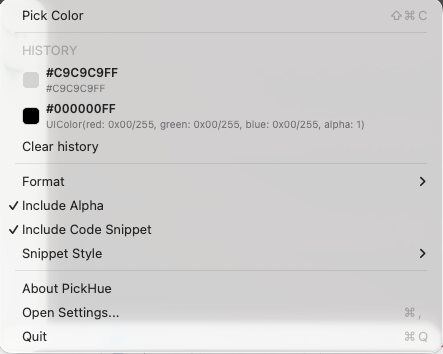
Independent apps / New perspectives
Every idea can start with a color.
[ 01 / Color utility ]
Bring a color from your screen straight into your work. Picking, output templates and recent colors stay within reach in the Mac menu bar.
Keep exploring[ 02 / Features ]
Every idea can start with a color.
Open the picker with a global shortcut. A magnifier follows your pointer, and the selected color is copied automatically.
Choose HEX, RGB, RGBA or a code snippet. Custom templates format the copied color for the tool you are using.
Copy a recent color again from the menu bar. History limits and settings are explained in the app, so your captured colors can keep working for you.
[ 03 / PickHue in your day ]
From a moment of inspiration to a color you can work with.
PickHue / Screen picking
Open the picker with a global shortcut. A magnifier follows your pointer, and the selected color is copied automatically.
Get PickHueMenu bar picker and recent colors
[ 04 / Interface and details ]
Real app interfaces and English store previews.
[ 05 / Download ]
macOS 12 or later. Screen Recording permission is required to sample screen pixels.
macOS requires this permission to read screen pixels for color picking.
HEX, RGB, RGBA, code snippets for several languages, and custom output templates.
The core color picking feature works offline.
[ PickHue / Made for the everyday ]