 App Dock
Binarow / 1.0
Last updated: October 15, 2026
Getting started
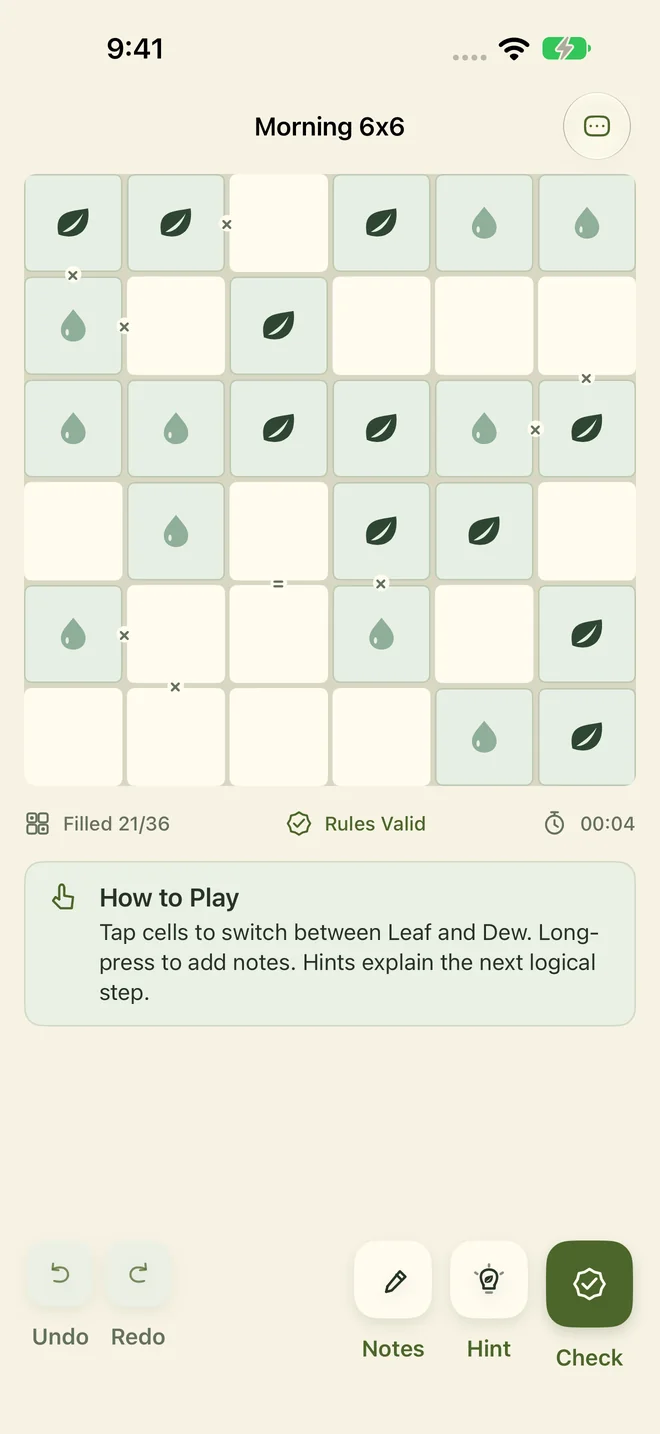
Choose the tutorial, campaign, daily challenge or practice from the lobby. Start with the short tutorial, then get comfortable with Leaf and Dew on a basic board.
Binarow is preparing for its first release and is not yet available on the App Store. This page covers version 1.0.
Common questions
How do I fill or clear a cell?
Tap an editable cell to cycle through empty, Leaf, Dew and empty again. Given cells stay fixed. Long-press an empty cell to add candidate notes, or use Notes mode.
What are the basic rules?
Each row and column needs equal numbers of Leaf and Dew. Three identical symbols cannot sit in a row horizontally or vertically, and completed rows and columns must be distinct. An equals sign between neighbors means they match; a cross means they differ.
What if I get stuck?
Hint highlights the next step and explains its logic. Check flags rule conflicts; undo, redo and candidate notes let you revisit an idea. These tools are free.
What is free?
Three current-day boards, the first 40 campaign levels, five basic practice games per day, the tutorial and all basic solving tools are free. The Warm Paper and high-contrast Graphite boards and accessibility settings are also free.
What does Pro unlock? Is it a subscription?
Pro is a one-time, non-consumable purchase priced at US$4.99 in the US, with no subscription. It unlocks all 400 campaign levels, unlimited practice including higher difficulties, unfinished archived daily boards, and immediate access to all premium board styles. Local prices are shown in the App Store.
How do I restore Pro?
Use the Apple Account that made the purchase, open Settings → Restore Purchases, and stay connected to the internet. Restoration restores Pro only. Apple handles billing and refunds.
Will progress sync to a new device?
Binarow does not currently provide in-app cloud synchronization. Puzzle records stay on this device; restoring Pro does not restore level progress. Device backup and restoration are managed by your operating system.
Can I turn off sound, haptics or animation?
Sound Effects and Haptics have independent switches in Settings; sound also respects the system silent setting. Motion follows the system Reduce Motion setting. Enhanced symbols, VoiceOver and Dynamic Type are supported.
How do I turn off usage analytics?
Turn off Help Improve Binarow in Settings. This feature is off by default. Turning it off stops future Firebase analytics and clears local analytics data without limiting play or purchases.
How do I remove local progress?
Open Settings → Reset Local Progress and confirm. This removes local puzzle records and statistics and cannot be undone. It keeps settings and does not cancel App Store purchases. Avoid resetting progress just to troubleshoot a minor issue.
Boards and accessibility
Preview six styles in Board Workshop. Warm Paper and high-contrast Graphite are free. Earn premium styles through play milestones or unlock them immediately with Pro.
Binarow requires iOS / iPadOS 16 or later on iPhone or iPad and supports English and Simplified Chinese. It supports Dynamic Type, VoiceOver and Reduce Motion, plus enhanced symbols in the app.
Troubleshooting and local records
If Pro has not appeared, check your connection and original Apple Account, then use Restore Purchases. If needed, close and reopen the app and try again. Do not reset game progress to restore a purchase.
For display or sound issues, check your system text size, silent setting and in-app options. The current board is saved locally so you can resume after reopening. Uninstalling the app or resetting progress may remove local records.
Privacy and more information
Core puzzles work offline, without ads or a separate account. Usage analytics is off by default and can be enabled voluntarily or turned off in Settings. Read the Privacy Policy for details.